Instagram Reels Download – Fast & Free Online Tool
We built this downloader for people like us—those moments when a Reel makes you smile, teaches something new, or inspires an idea and you want to keep it on your device. Our online tool helps you download Instagram Reels videos quickly and safely on mobile or computer. You can save your favorite clips and watch them anytime, even without internet.
Downloat is a simple, free online tool designed to help you save Instagram Reels videos to your device without hassle. It works quickly on both mobile phones and computers, so you can download the Reels you enjoy and watch them offline whenever you want. We don’t ask for login or personal details—just paste the link and your video is ready to be saved.
Here’s a fast and easy way to download Instagram Reels:
Steps to Download Reels From Instagram
Step 1: Open Instagram and select the Reel you want to save. Choose content that you personally enjoy or need for reference.
Step 2: Tap the Share option and copy the Reel URL/link. This link is all you need to continue.
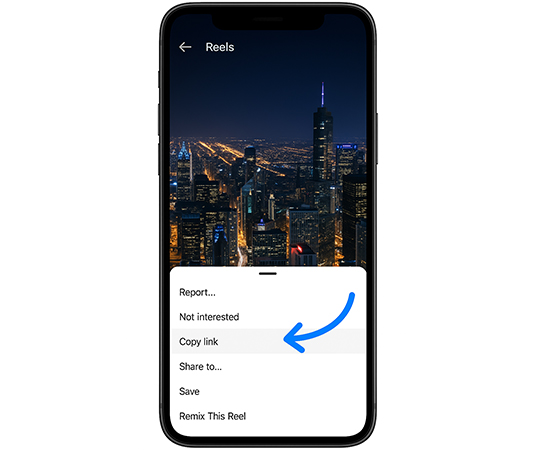
Step 3: Open the website: Downloat on your mobile browser or computer. No app installation is required.
Step 4: Paste the copied link into the input box on our homepage. The tool will read the link and prepare your file.
Step 5: Click the “Download Video” button to save the Reel directly to your device gallery or downloads folder.
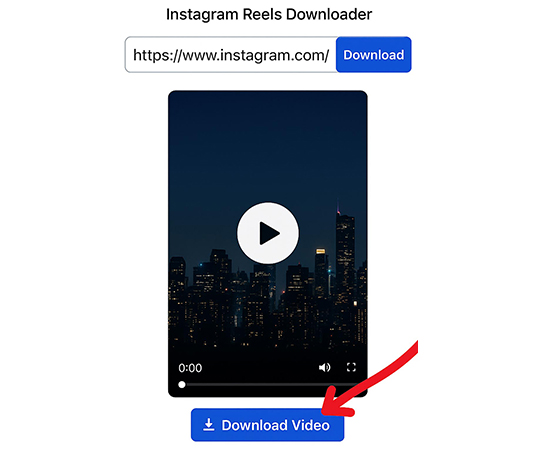
How the Downloat Downloader Works
The Downloat Reels downloader helps users save Instagram Reels, videos, and photos by using the link you provide. Once the URL is pasted, our system fetches the original file and allows you to download it without watermark in common formats like MP4 or JPG. The process stays inside your browser so it feels easy for everyone.
Key Features
-
Downloads in original quality with no added logos
-
Works on any device — Android mobile, iPhone, iPad, PC, or tablet
-
No software to install; use it online through your browser
-
Completely free; ads support server and new improvements
-
We never request passwords or personal information
The service is open for personal use and does not store your files.
How to Download Instagram Reels Online
Watching Reels on Instagram is simple, but saving them to your phone can be difficult because Instagram does not provide a direct download option. Downloat, a web-based tool, fills that gap by letting you save the media you have permission to use in high-quality formats. Just copy the link, paste it here, and download in seconds.
Important Note on Copyright
Downloading Instagram content without the creator’s permission may go against Instagram terms. Please only save videos that you are allowed to use or that are shared under Creative Commons or similar open licenses.
DMCA Compliance
Downloat follows 17 U.S.C. § 512 and the Digital Millennium Copyright Act. If any copyrighted material appears on the site without approval and the owner asks for removal, we respond quickly and take the necessary action. You can reach us through the contact page to report concerns.
How to Download in 3 Simple Steps
Copy URL
Copy the link of the post you want to save.
Copy post link
Paste & Click
Paste the URL and hit the "Download" button.
Paste link & click
Save Media
Save the file directly to your device.
Save to device
Instagram Reels Downloader 2026
Looking for the best way to download Instagram Reels in high quality? Downloat is your ultimate Instagram Reels Video Downloader, allowing you to save Reels without watermark directly to your gallery. Whether you want to download Instagram Reels HD or save IG Reels with audio 100% free, our tool is fast, secure, and works on iPhone, Android, and PC.
- Free Instagram Reels Downloader - No login required.
- High Quality - Save IG Reels in HD (1080p).
- No Watermark - Get clean Reels videos for offline viewing.
- Fast & Easy - Just paste the link and download in seconds.